Memory management is vital for efficient resource use, system stability, and performance. In an unmanaged languages like C, poor memory management can cause performance degradation, application crashes, and security vulnerabilities. Addressing these issues is essential to ensure reliable and secure software.
There are powerful tools available to catch memory issues, one of which is Sanitizers. Sanitizers are runtime analysis tools that instrument code during compilation to detect programming errors such as memory issues, undefined behaviours, and race conditions. They rely on compiler instrumentation to insert runtime checks around memory accesses and reports violations as they occur. Techniques like shadow memory are also employed to track the validity of memory states.
A wide range of sanitizers is available, including AddressSanitizer, MemorySanitizer, ThreadSanitizer, and UndefinedBehaviorSanitizer, applicable to both user-space and kernel code. The sanitizers are supported by major OS platforms (Linux, OS X, iOS Simulator, FreeBSD, Android) and compilers like GCC and Clang, enabling developers to address issues effectively. Refer to the compiler documentation for specific sanitizer options.
AddressSanitizer (ASan)
AddressSanitizer (ASan) is a runtime memory error detector for C/C++ programs. It uses compiler instrumentation and shadow memory to detect and report memory issues effectively. ASan helps identify common memory-related problems such as:
- Use after free (dangling pointer de-reference)
- Heap buffer overflow
- Stack buffer overflow
- Global buffer overflow
- Use after return
- Use after scope
- Initialization order bugs
- Memory leaks
Installation and Usage
To use AddressSanitizer, the libasan library must be installed on your system. On Ubuntu, it can be installed using the command: sudo apt-get install libasan8. Note that the number in libasan (e.g., 8) corresponds to the compatible version of the library with your GCC version. For example, libasan8 is compatible with GCC version 12.
You can verify this compatibility by running apt-cache show libasan8. In the “Depends” section of the output, you will find the GCC version it supports—in this case, GCC 12.
ubuntu@sandbox:~$ apt-cache show libasan8
Package: libasan8
...
Depends: gcc-12-base (= 12.3.0-1ubuntu1~22.04), libc6 (>= 2.34), libgcc-s1 (>= 3.3)
...
To check gcc version you can use command gcc --version.
ubuntu@sandbox:~$ gcc --version
gcc (Ubuntu 12.3.0-1ubuntu1~22.04) 12.3.0
...
To enable AddressSanitizer (ASan), compile your code with the -fsanitize=address compiler option. Additionally, it is recommended to include the -fno-omit-frame-pointer option to ensure a reliable stack trace when an issue is detected.
gcc -fsanitize=address -fno-omit-frame-pointer -g -O1 -o program program.c
ASan Demonstration
We will demonstrate AddressSanitizer (ASan) using a sample program intentionally written with three memory-related issues. This will help illustrate how ASan detects and reports such errors during runtime.
Out-of-bound memory issue code:
void out_of_bounds_access() {
    int arr[5];
    // Condition: Accessing array out of bounds (i=5).
#ifdef CAUSE_OUT_BOUND
    for (int i = 0; i <= 5; i++) {
#else
    for (int i = 0; i < 5; i++) {
#endif
        arr[i] = i * 10;
    }
}
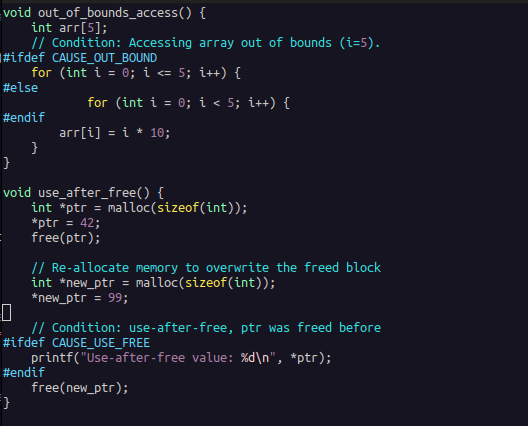
The sample program includes an integer array of size 5. While initializing the array, it writes to the 6th element, which exceeds the array’s upper bound. This out-of-bounds write can be enabled or disabled by defining or undefining the CAUSE_OUT_BOUND macro.
Use-after-free memory issue code:
void use_after_free() {
    int *ptr = malloc(sizeof(int));
    *ptr = 42;
    free(ptr);

    // Re-allocate memory to overwrite the freed block
    int *new_ptr = malloc(sizeof(int));
    *new_ptr = 99;

    // Condition: use-after-free, ptr was freed before
#ifdef CAUSE_USE_FREE
    printf("Use-after-free value: %d\n", *ptr);
#endif
    free(new_ptr);
}
In the program, we dynamically allocate memory for an integer, assign its address to a pointer ptr, initialize it with a value, and then free the memory. Subsequently, we reallocate memory, overwriting the previously freed block, and repeat the operation. However, in a print statement, we attempt to access ptr after it has been freed, resulting in a use-after-free memory issue. This issue can be enabled or disabled by defining or undefining the CAUSE_USE_FREE macro.
Memory-leak code:
void memory_leak() {
    int *leaked_ptr = malloc(10 * sizeof(int));
    for (int i = 0; i < 10; i++) {
        leaked_ptr[i] = i * i;
    }
    printf("Leaked memory initialized.\n");
    // Condition: Memory leak, Intentionally no free here.
#ifndef CAUSE_MEM_LEAK
    free(leaked_ptr);
#endif
}
The program allocates memory for 10 integers and initializes it. However, the allocated memory is not freed before the program exits, causing a memory leak. This memory leak issue can be enabled or disabled by defining or undefining the CAUSE_MEM_LEAK macro.
In the CMake file, the -fsanitize=address compiler option is used to enable AddressSanitizer, along with the -fno-omit-frame-pointer option to ensure a reliable stack trace for effective debugging.
Next, we will build the program using the provided helper build script.
ubuntu@sandbox:~/work/Examples/Sanitizers/Asan$ ./build.sh
-- The C compiler identification is GNU 12.3.0
-- Detecting C compiler ABI info
-- Detecting C compiler ABI info - done
-- Check for working C compiler: /usr/bin/cc - skipped
-- Detecting C compile features
-- Detecting C compile features - done
-- Configuring done
-- Generating done
-- Build files have been written to: /home/ubuntu/work/Examples/Sanitizers/Asan
[ 50%] Building C object CMakeFiles/asan_demo.dir/main.c.o
[100%] Linking C executable asan_demo
[100%] Built target asan_demo
The application binary is named asan_demo. You can use the ldd command to verify that libasan is linked to the binary and ensure AddressSanitizer is properly integrated.
ubuntu@sandbox:~/work/Examples/Sanitizers/Asan$ ldd asan_demo
 linux-vdso.so.1 (0x00007ffc417ed000)
 libasan.so.8 => /lib/x86_64-linux-gnu/libasan.so.8 (0x00007553be800000)
 libc.so.6 => /lib/x86_64-linux-gnu/libc.so.6 (0x00007553be400000)
 libm.so.6 => /lib/x86_64-linux-gnu/libm.so.6 (0x00007553beeff000)
 libgcc_s.so.1 => /lib/x86_64-linux-gnu/libgcc_s.so.1 (0x00007553beedf000)
 /lib64/ld-linux-x86-64.so.2 (0x00007553bf00a000)
Run the program as usual. If AddressSanitizer (ASan) detects a memory error during runtime, it will generate an error message along with a detailed stack trace, pinpointing the source of the issue for easier debugging.
Out-of-bound memory issue report:
Now, we will execute the program. The first error we encounter is an out-of-bounds error, which occurs when the program tries to write outside the allocated memory for the array.
ubuntu@sandbox:~/work/Examples/Sanitizers/Asan$ ./asan_demo
=================================================================
==8709==ERROR: AddressSanitizer: stack-buffer-overflow on address 0x7ffd02937fe4 at pc 0x5a828e8fa4a9 bp 0x7ffd02937fa0 sp 0x7ffd02937f90
WRITE of size 4 at 0x7ffd02937fe4 thread T0
    #0 0x5a828e8fa4a8 in out_of_bounds_access /home/ubuntu/work/Examples/Sanitizers/Asan/main.c:16
    #1 0x5a828e8fa5ae in main /home/ubuntu/work/Examples/Sanitizers/Asan/main.c:49
    #2 0x7f7038029d8f in __libc_start_call_main ../sysdeps/nptl/libc_start_call_main.h:58
    #3 0x7f7038029e3f in __libc_start_main_impl ../csu/libc-start.c:392
    #4 0x5a828e8fa1e4 in _start (/home/ubuntu/work/Examples/Sanitizers/Asan/asan_demo+0x11e4)

Address 0x7ffd02937fe4 is located in stack of thread T0 at offset 52 in frame
    #0 0x5a828e8fa2b8 in out_of_bounds_access /home/ubuntu/work/Examples/Sanitizers/Asan/main.c:8

  This frame has 1 object(s):
    [32, 52) 'arr' (line 9) <== Memory access at offset 52 overflows this variable
HINT: this may be a false positive if your program uses some custom stack unwind mechanism, swapcontext or vfork
      (longjmp and C++ exceptions *are* supported)
SUMMARY: AddressSanitizer: stack-buffer-overflow /home/ubuntu/work/Examples/Sanitizers/Asan/main.c:16 in out_of_bounds_access
Shadow bytes around the buggy address:
  0x10002051efa0: 00 00 00 00 00 00 00 00 00 00 00 00 00 00 00 00
  0x10002051efb0: 00 00 00 00 00 00 00 00 00 00 00 00 00 00 00 00
  0x10002051efc0: 00 00 00 00 00 00 00 00 00 00 00 00 00 00 00 00
  0x10002051efd0: 00 00 00 00 00 00 00 00 00 00 00 00 00 00 00 00
  0x10002051efe0: 00 00 00 00 00 00 00 00 00 00 00 00 00 00 00 00
=>0x10002051eff0: 00 00 00 00 00 00 f1 f1 f1 f1 00 00[04]f3 f3 f3
  0x10002051f000: f3 f3 00 00 00 00 00 00 00 00 00 00 00 00 00 00
  0x10002051f010: 00 00 00 00 00 00 00 00 00 00 00 00 00 00 00 00
  0x10002051f020: 00 00 00 00 00 00 00 00 00 00 00 00 00 00 00 00
  0x10002051f030: 00 00 00 00 00 00 00 00 00 00 00 00 00 00 00 00
  0x10002051f040: 00 00 00 00 00 00 00 00 00 00 00 00 00 00 00 00
Shadow byte legend (one shadow byte represents 8 application bytes):
  Addressable:           00
  Partially addressable: 01 02 03 04 05 06 07
  Heap left redzone:       fa
  Freed heap region:       fd
  Stack left redzone:      f1
  Stack mid redzone:       f2
  Stack right redzone:     f3
  Stack after return:      f5
  Stack use after scope:   f8
  Global redzone:          f9
  Global init order:       f6
  Poisoned by user:        f7
  Container overflow:      fc
  Array cookie:            ac
  Intra object redzone:    bb
  ASan internal:           fe
  Left alloca redzone:     ca
  Right alloca redzone:    cb
==8709==ABORTING
Let’s look into the key details from the report.
=================================================================
==8709==ERROR: AddressSanitizer: stack-buffer-overflow on address 0x7ffd02937fe4 at pc 0x5a828e8fa4a9 bp 0x7ffd02937fa0 sp 0x7ffd02937f90
WRITE of size 4 at 0x7ffd02937fe4 thread T0
The heading of the error message indicates the type of memory issue detected, along with the address, program counter, and other relevant CPU registers. In this case, the issue is a stack-buffer-overflow, caused by a write of size 4 at the specified address.
#0 0x5a828e8fa4a8 in out_of_bounds_access /home/ubuntu/work/Examples/Sanitizers/Asan/main.c:16
#1 0x5a828e8fa5ae in main /home/ubuntu/work/Examples/Sanitizers/Asan/main.c:49
#2 0x7f7038029d8f in __libc_start_call_main ../sysdeps/nptl/libc_start_call_main.h:58
#3 0x7f7038029e3f in __libc_start_main_impl ../csu/libc-start.c:392
#4 0x5a828e8fa1e4 in _start (/home/ubuntu/work/Examples/Sanitizers/Asan/asan_demo+0x11e4)

Address 0x7ffd02937fe4 is located in stack of thread T0 at offset 52 in frame
    #0 0x5a828e8fa2b8 in out_of_bounds_access /home/ubuntu/work/Examples/Sanitizers/Asan/main.c:8
The next block is the stack trace. Stack trace is pointing to the function call where the issue occured.
This frame has 1 object(s):
    [32, 52) 'arr' (line 9) <== Memory access at offset 52 overflows this variable
HINT: this may be a false positive if your program uses some custom stack unwind mechanism, swapcontext or vfork
      (longjmp and C++ exceptions *are* supported)
SUMMARY: AddressSanitizer: stack-buffer-overflow /home/ubuntu/work/Examples/Sanitizers/Asan/main.c:16 in out_of_bounds_access
The buffer overflow is caused by accessing an associated object, in this case, the array arr. The array is allocated between offsets 32 and 52, and the access occurs at offset 52, which overflows the last byte of the array.
Shadow bytes around the buggy address:
  0x10002051efa0: 00 00 00 00 00 00 00 00 00 00 00 00 00 00 00 00
  0x10002051efb0: 00 00 00 00 00 00 00 00 00 00 00 00 00 00 00 00
  0x10002051efc0: 00 00 00 00 00 00 00 00 00 00 00 00 00 00 00 00
  0x10002051efd0: 00 00 00 00 00 00 00 00 00 00 00 00 00 00 00 00
  0x10002051efe0: 00 00 00 00 00 00 00 00 00 00 00 00 00 00 00 00
=>0x10002051eff0: 00 00 00 00 00 00 f1 f1 f1 f1 00 00[04]f3 f3 f3
  0x10002051f000: f3 f3 00 00 00 00 00 00 00 00 00 00 00 00 00 00
  0x10002051f010: 00 00 00 00 00 00 00 00 00 00 00 00 00 00 00 00
  0x10002051f020: 00 00 00 00 00 00 00 00 00 00 00 00 00 00 00 00
  0x10002051f030: 00 00 00 00 00 00 00 00 00 00 00 00 00 00 00 00
  0x10002051f040: 00 00 00 00 00 00 00 00 00 00 00 00 00 00 00 00
Next, we have shadow memory mappings, which provide metadata about the application memory. Each shadow byte corresponds to 8 bytes of application memory. When an issue occurs, the pointer in the error report points to the shadow memory mapping related to the buggy address.
The addressable memory of the array is surrounded by inaccessible memory zones for protection. In the shadow memory, f1 represents the left guard zone of the stack, and f3 represents the right guard zone. The 0s indicate the addressable memory, while numbers like [04] represent partially addressable ranges. In this case, 04 means that 4 out of 8 bytes are valid, helping to visualize the precise memory boundaries and detect overflows.
Let’s fix the out of bound memory issue and try to find other issues present in our code.
Use-after-free memory issue report:
This time, we encounter a use-after-free memory issue. The program attempts to access memory that was freed earlier, which results in undefined behavior.
ubuntu@sandbox:~/work/Examples/Sanitizers/Asan$ ./asan_demo
=================================================================
==8844==ERROR: AddressSanitizer: heap-use-after-free on address 0x602000000010 at pc 0x5f75065c0502 bp 0x7ffee6601c20 sp 0x7ffee6601c10
READ of size 4 at 0x602000000010 thread T0
    #0 0x5f75065c0501 in use_after_free /home/ubuntu/work/Examples/Sanitizers/Asan/main.c:31
    #1 0x5f75065c0583 in main /home/ubuntu/work/Examples/Sanitizers/Asan/main.c:50
    #2 0x743c3f429d8f in __libc_start_call_main ../sysdeps/nptl/libc_start_call_main.h:58
    #3 0x743c3f429e3f in __libc_start_main_impl ../csu/libc-start.c:392
    #4 0x5f75065c01e4 in _start (/home/ubuntu/work/Examples/Sanitizers/Asan/asan_demo+0x11e4)

0x602000000010 is located 0 bytes inside of 4-byte region [0x602000000010,0x602000000014)
freed by thread T0 here:
    #0 0x743c3f8be470 in __interceptor_free ../../../../src/libsanitizer/asan/asan_malloc_linux.cpp:52
    #1 0x5f75065c04c5 in use_after_free /home/ubuntu/work/Examples/Sanitizers/Asan/main.c:23
    #2 0x5f75065c0583 in main /home/ubuntu/work/Examples/Sanitizers/Asan/main.c:50
    #3 0x743c3f429d8f in __libc_start_call_main ../sysdeps/nptl/libc_start_call_main.h:58

previously allocated by thread T0 here:
    #0 0x743c3f8bf91f in __interceptor_malloc ../../../../src/libsanitizer/asan/asan_malloc_linux.cpp:69
    #1 0x5f75065c04ba in use_after_free /home/ubuntu/work/Examples/Sanitizers/Asan/main.c:21
    #2 0x5f75065c0583 in main /home/ubuntu/work/Examples/Sanitizers/Asan/main.c:50
    #3 0x743c3f429d8f in __libc_start_call_main ../sysdeps/nptl/libc_start_call_main.h:58

SUMMARY: AddressSanitizer: heap-use-after-free /home/ubuntu/work/Examples/Sanitizers/Asan/main.c:31 in use_after_free
Shadow bytes around the buggy address:
  0x0c047fff7fb0: 00 00 00 00 00 00 00 00 00 00 00 00 00 00 00 00
  0x0c047fff7fc0: 00 00 00 00 00 00 00 00 00 00 00 00 00 00 00 00
  0x0c047fff7fd0: 00 00 00 00 00 00 00 00 00 00 00 00 00 00 00 00
  0x0c047fff7fe0: 00 00 00 00 00 00 00 00 00 00 00 00 00 00 00 00
  0x0c047fff7ff0: 00 00 00 00 00 00 00 00 00 00 00 00 00 00 00 00
=>0x0c047fff8000: fa fa[fd]fa fa fa fa fa fa fa fa fa fa fa fa fa
  0x0c047fff8010: fa fa fa fa fa fa fa fa fa fa fa fa fa fa fa fa
  0x0c047fff8020: fa fa fa fa fa fa fa fa fa fa fa fa fa fa fa fa
  0x0c047fff8030: fa fa fa fa fa fa fa fa fa fa fa fa fa fa fa fa
  0x0c047fff8040: fa fa fa fa fa fa fa fa fa fa fa fa fa fa fa fa
  0x0c047fff8050: fa fa fa fa fa fa fa fa fa fa fa fa fa fa fa fa
Shadow byte legend (one shadow byte represents 8 application bytes):
  Addressable:           00
  Partially addressable: 01 02 03 04 05 06 07
  Heap left redzone:       fa
  Freed heap region:       fd
  Stack left redzone:      f1
  Stack mid redzone:       f2
  Stack right redzone:     f3
  Stack after return:      f5
  Stack use after scope:   f8
  Global redzone:          f9
  Global init order:       f6
  Poisoned by user:        f7
  Container overflow:      fc
  Array cookie:            ac
  Intra object redzone:    bb
  ASan internal:           fe
  Left alloca redzone:     ca
  Right alloca redzone:    cb
==8844==ABORTING
Looking into the error report, the issue is caused by a use-after-free error. The program attempts to read 4 bytes of memory at a given address that has already been freed.
#0 0x5f75065c0501 in use_after_free /home/ubuntu/work/Examples/Sanitizers/Asan/main.c:31
    #1 0x5f75065c0583 in main /home/ubuntu/work/Examples/Sanitizers/Asan/main.c:50
    #2 0x743c3f429d8f in __libc_start_call_main ../sysdeps/nptl/libc_start_call_main.h:58
    #3 0x743c3f429e3f in __libc_start_main_impl ../csu/libc-start.c:392
    #4 0x5f75065c01e4 in _start (/home/ubuntu/work/Examples/Sanitizers/Asan/asan_demo+0x11e4)
The stack trace provides detailed information about the sequence of function calls leading to the issue. It points to the exact location where the use-after-free error occurred.
0x602000000010 is located 0 bytes inside of 4-byte region [0x602000000010,0x602000000014)
The next line in the error report provides details about the memory block involved in the issue. The allocated memory block was 4 bytes in size, starting at address 0x602000000010 and ending at 0x602000000014. The problematic access occurred exactly at the start of this region, at address 0x602000000010 (0 bytes offset).
freed by thread T0 here:
    #0 0x743c3f8be470 in __interceptor_free ../../../../src/libsanitizer/asan/asan_malloc_linux.cpp:52
    #1 0x5f75065c04c5 in use_after_free /home/ubuntu/work/Examples/Sanitizers/Asan/main.c:23
    #2 0x5f75065c0583 in main /home/ubuntu/work/Examples/Sanitizers/Asan/main.c:50
    #3 0x743c3f429d8f in __libc_start_call_main ../sysdeps/nptl/libc_start_call_main.h:58

previously allocated by thread T0 here:
    #0 0x743c3f8bf91f in __interceptor_malloc ../../../../src/libsanitizer/asan/asan_malloc_linux.cpp:69
    #1 0x5f75065c04ba in use_after_free /home/ubuntu/work/Examples/Sanitizers/Asan/main.c:21
    #2 0x5f75065c0583 in main /home/ubuntu/work/Examples/Sanitizers/Asan/main.c:50
    #3 0x743c3f429d8f in __libc_start_call_main ../sysdeps/nptl/libc_start_call_main.h:58
These two traces provide a history of the object’s lifecycle. The first trace indicates where the memory was freed, pointing to the exact location in the code where the free operation occurred. The second trace shows where the memory was initially allocated, providing the original location where the memory block was created. Together, these traces help to understand the sequence of events that led to the use-after-free issue.
Shadow bytes around the buggy address:
  0x0c047fff7fb0: 00 00 00 00 00 00 00 00 00 00 00 00 00 00 00 00
  0x0c047fff7fc0: 00 00 00 00 00 00 00 00 00 00 00 00 00 00 00 00
  0x0c047fff7fd0: 00 00 00 00 00 00 00 00 00 00 00 00 00 00 00 00
  0x0c047fff7fe0: 00 00 00 00 00 00 00 00 00 00 00 00 00 00 00 00
  0x0c047fff7ff0: 00 00 00 00 00 00 00 00 00 00 00 00 00 00 00 00
=>0x0c047fff8000: fa fa[fd]fa fa fa fa fa fa fa fa fa fa fa fa fa
  0x0c047fff8010: fa fa fa fa fa fa fa fa fa fa fa fa fa fa fa fa
  0x0c047fff8020: fa fa fa fa fa fa fa fa fa fa fa fa fa fa fa fa
  0x0c047fff8030: fa fa fa fa fa fa fa fa fa fa fa fa fa fa fa fa
  0x0c047fff8040: fa fa fa fa fa fa fa fa fa fa fa fa fa fa fa fa
  0x0c047fff8050: fa fa fa fa fa fa fa fa fa fa fa fa fa fa fa fa
In the shadow memory section, we analyze the pointed buggy address. FA denotes a Heap redzone, which is a guard region used to detect buffer overflows. The fd entry indicates a Freed heap region, meaning the memory was previously allocated but has now been freed. The shadow memory points to the exact location that has been freed, but the program attempts to reference it again, leading to the use-after-free error.
Let’s fix the use-after-free and see the remaining issue in our program.
Memory leak error report
ubuntu@sandbox:~/work/Examples/Sanitizers/Asan$ ./asan_demo
Leaked memory initialized.

=================================================================
==8906==ERROR: LeakSanitizer: detected memory leaks

Direct leak of 40 byte(s) in 1 object(s) allocated from:
    #0 0x7541cdebf91f in __interceptor_malloc ../../../../src/libsanitizer/asan/asan_malloc_linux.cpp:69
    #1 0x5ccf6207745a in memory_leak /home/ubuntu/work/Examples/Sanitizers/Asan/main.c:37
    #2 0x5ccf620774ca in main /home/ubuntu/work/Examples/Sanitizers/Asan/main.c:51
    #3 0x7541cda29d8f in __libc_start_call_main ../sysdeps/nptl/libc_start_call_main.h:58

SUMMARY: AddressSanitizer: 40 byte(s) leaked in 1 allocation(s).
AddressSanitizer (ASan) is reporting a memory leak. The stack trace points to the location where the leaked memory was allocated, providing context on where the memory was not properly freed. In the summary, ASan also reports the total number of leaked bytes, helping to quantify the memory that was allocated but not deallocated, thus causing the leak.
The added instrumentation significantly slows down the program and it is recommended to use ASan in development and testing environment only. You can refer to various ASAN options here.
I hope this demonstration was helpful for you to understand the address sanitizer and its usage.
LINUX DEBUG TRAINING
If you want to dive deeper, then you can also check out Part One and Part Two of the Linux Debugging Training Course. This course is a collaboration between my colleague John OSullivan and myself. We have combined our many years of experience in developing and debugging Linux systems to create a comprehensive technical guide that consolidates our knowledge.
This course offers a structured approach to Linux debugging, covering the entire stack — from user-space to kernel-space.
Join the course today! Access it via these links: Part 1, Part 2