Kexec & Kdump
Kexec and Kdump are mechanisms in the Linux kernel used to capture and recover the kernel memory snapshot (/proc/vmcore) after a kernel panic, without requiring a full system reboot. It enables the preservation and retrieval of the system kernel’s memory image, which can later be used for detailed post-mortem analysis to diagnose the cause of the crash.
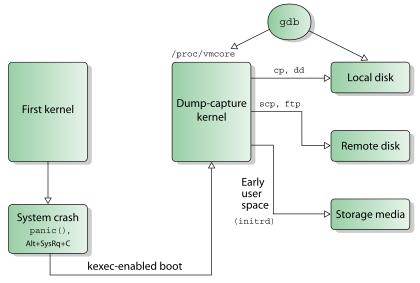
Image Credit: Wikipedia
- On panic, the kernel’s kexec support allows the execution of a “dump-capture” kernel directly from the crashed kernel.
- The “dump-capture” or Kdump kernel includes only the essential device drivers and features required to capture the crash dump.
- Kexec reserves a small section of memory in the RAM for the dump-capture kernel.
- Use
crashkernelkernel boot parameter to specify the memory region for dump-capture kernel. - The
kexec -pcommand loads the dump-capture kernel into the reserved memory.
/sbin/kexec -p - command-line="BOOT_IMAGE=/boot/vmlinuz-6.8.0–40-generic root=UUID=3e78aa08-eb2d-4019-b50c-ade108081f72 ro quiet splash vt.handoff=7 reset_devices systemd.unit=kdump-tools-dump.service nr_cpus=1 irqpoll nousb" - initrd=/var/lib/kdump/initrd.img /var/lib/kdump/vmlinuz
- After booting from the “dump-capture” kernel, the kernel coredump found at
/proc/vmcorecan be stored as a file on the local filesystem or sent remotely over NFS or SSH.
Kexec & Kdump configuration on Ubuntu 22.04 environment
The Linux kernel documentation explains the kexec and kdump mechanisms and their configuration in detail. This post discusses how to configure kexec and kdump in an Ubuntu 22.04 environment.
Installation and Configuration
linux-crashdump package provides all necessary tools to configure Kexec and Kdump.
sudo apt install linux-crashdump
During the package installation, when prompted, select ‘Yes’ to allow kexec-tools to handle reboots.
┌────────────────────────┤ Configuring kexec-tools ├────────────────────────┐
 │                                                                           │
 │ If you choose this option, a system reboot will trigger a restart into a  │
 │ kernel loaded by kexec instead of going through the full system boot      │
 │ loader process.                                                           │
 │                                                                           │
 │ Should kexec-tools handle reboots?                                        │
 │                                                                           │
 │                                                                  │
 │                                                                           │
 └───────────────────────────────────────────────────────────────────────────┘
Select ‘Yes’ to enable Kdump.
┌────────────────────────┤ Configuring kdump-tools ├────────────────────────┐
 │                                                                           │
 │ If you choose this option, the kdump-tools mechanism will be enabled. A   │
 │ reboot is still required in order to enable the crashkernel kernel        │
 │ parameter.                                                                │
 │                                                                           │
 │ Should kdump-tools be enabled by default?                                 │
 │                                                                           │
 │                                                                  │
 │                                                                           │
 └───────────────────────────────────────────────────────────────────────────┘
After installation, you can confirm the status of kexec and kdump by checking the respective configuration files.
# Invoke root user using 'sudo su' command.

root@sandbox:~# cat /etc/default/kexec | grep LOAD_KEXEC
LOAD_KEXEC=true

root@sandbox:~# cat /etc/default/kdump-tools | grep USE_KDUMP
# USE_KDUMP - controls kdump will be configured
USE_KDUMP=1
You can also manually enable the Kexec and Kdump functionality using dpkg-reconfigure kexec-tools and dpkg-reconfigure kdump-tools.
Increase the reserved memory size for dump-capture kernel
“/etc/default/grub.d/kdump-tools.cfg” defines the crashkernel boot parameter, which is appended to the kernel command line. I found that the default size was insufficient for my needs, so I increased it. Depending on the size of your RAM, you may need to adjust the crashkernel boot parameter accordingly.
root@sandbox:~# cat /etc/default/grub.d/kdump-tools.cfg
GRUB_CMDLINE_LINUX_DEFAULT="$GRUB_CMDLINE_LINUX_DEFAULT crashkernel=2G-:512M"

root@sandbox:~# update-grub
Install Linux debug symbols on Ubuntu 22.04
Linux debug symbols or the vmlinux file is required to analyze the core dump. Follow the below given instructions to install vmlinux on Ubuntu 22.04.
- Import the signing key
sudo apt install ubuntu-dbgsym-keyring
- Create a ddebs.list file
echo "deb http://ddebs.ubuntu.com $(lsb_release -cs) main restricted universe multiverse
deb http://ddebs.ubuntu.com $(lsb_release -cs)-updates main restricted universe multiverse
deb http://ddebs.ubuntu.com $(lsb_release -cs)-proposed main restricted universe multiverse" | \
sudo tee -a /etc/apt/sources.list.d/ddebs.list
- Install Linux debug symbols
sudo apt-get update
sudo apt-get install linux-image-`uname -r`-dbgsym
root@sandbox:/home/ubuntu# ls /lib/debug/boot/
vmlinux-6.8.0–40-generic
Reboot the system to enable the kdump-tools.
At any time, if you choose to update the Kdump and Kexec configuration, you can reload the Kdump using the command kdump-config reload.
root@sandbox:~# kdump-config reload
 * unloaded kdump kernel
 * Creating symlink /var/lib/kdump/vmlinuz
 * Creating symlink /var/lib/kdump/initrd.img
 * loaded kdump kernel
Verify Kdump configuration after reboot
After reboot, verify the status of kdump using kdump-config show command.
root@sandbox:~# kdump-config show
DUMP_MODE:              kdump
USE_KDUMP:              1
KDUMP_COREDIR:          /var/crash
crashkernel addr: 0xb000000
   /var/lib/kdump/vmlinuz: symbolic link to /boot/vmlinuz-6.8.0-40-generic
kdump initrd:
   /var/lib/kdump/initrd.img: symbolic link to /var/lib/kdump/initrd.img-6.8.0-40-generic
current state:    ready to kdump

kexec command:
  /sbin/kexec -p --command-line="BOOT_IMAGE=/boot/vmlinuz-6.8.0-40-generic root=UUID=3e78aa08-eb2d-4019-b50c-ade108081f72 ro quiet splash vt.handoff=7 reset_devices systemd.unit=kdump-tools-dump.service nr_cpus=1 irqpoll nousb" --initrd=/var/lib/kdump/initrd.img /var/lib/kdump/vmlinuz
“Ready to kdump” indicates that your kdump configuration is correct.
Check the crashkernel parameter in kernel command line.
root@sandbox:/home/ubuntu# cat /proc/cmdline
BOOT_IMAGE=/boot/vmlinuz-6.8.0-40-generic root=UUID=3e78aa08-eb2d-4019-b50c-ade108081f72 ro quiet splash crashkernel=2G-:512M vt.handoff=7
Check the kernel boot logs to verify the memory reservation for the kdump kernel.
root@sandbox:/home/ubuntu# dmesg | grep -i crash
...
[    0.004218] crashkernel reserved: 0x000000000b000000 - 0x000000002b000000 (512 MB)
Trigger the crash kernel (the moment of truth!)
There are various ways to trigger a panic in the Linux kernel. For example, using a custom kernel module to induce a panic. However, we will use the ‘SysRq’ to trigger a panic and crash the kernel. You can read more about SysRq here.
# Invoke root user using 'sudo su' command.
# Crash the kernel using SysRq trigger
root@sandbox:~# echo c > /proc/sysrq-trigger
Upon triggering a kernel crash, the system memory is preserved, and the system boots directly into the kdump kernel, bypassing the usual BIOS initialisation process. This transition happens quickly, and the dump-capture process begins immediately.
On Ubuntu, it’s important to note that the system does not boot into the normal desktop mode at this point. To observe the kdump kernel capturing the memory dump, switch to a virtual terminal (press Ctrl+Alt+F3 after the crash) to see the dump-capture logs in action. During this phase, the kdump kernel uses the makedumpfile utility to capture /proc/vmcore and dmesg into the /var/crash directory. Refer the snapshot showing logs from kdump kernel.
After the memory dump is saved, the kdump kernel reboots, and the system then boots into the normal desktop mode. Because this process happens quickly, it may seem like the system has booted normally right after the crash, but the crash dump is completed in the background beforehand.
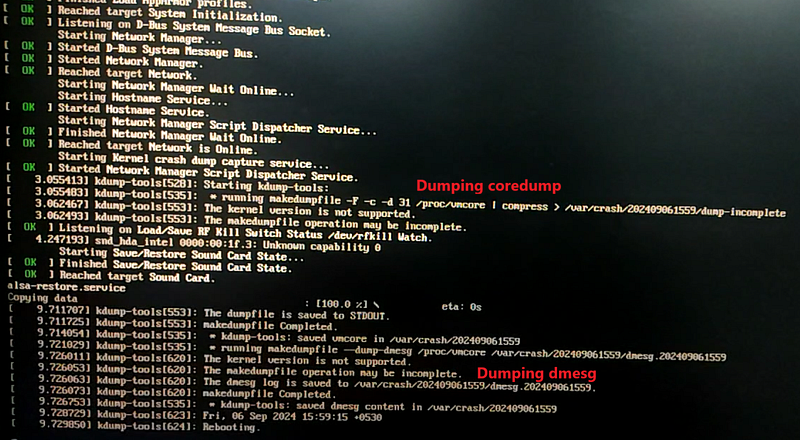 Kdump kernel dumping vmcore file in /var/crash
Core dump analysis
The core dumps are collected in /var/crash within a directory named with a date timestamp. The /proc/vmcore is saved in a file named dump.<timestamp>, and the dmesg output is saved in a file named dmesg.<timestamp>.
root@sandbox:/var/crash# tree
.
├── 202409061559
│   ├── dmesg.202409061559
│   └── dump.202409061559
├── kdump_lock
├── kexec_cmd
└── linux-image-6.8.0-40-generic-202409061210.crash

1 directory, 5 files
Core dump post-mortem analysis using crash utility
We can use the crash utility to perform a post-mortem analysis of the core dump. Load the vmlinux file and the core dump into the crash utility to analyze the cause of the crash. For example, using the bt (backtrace) command within crash, you can determine that the panic was triggered by sysrq_handle_crash
root@sandbox:/var/crash/202409061559# crash /usr/lib/debug/boot/vmlinux-6.8.0-40-generic dump.202409061559

WARNING: kernel version inconsistency between vmlinux and dumpfile

      KERNEL: /usr/lib/debug/boot/vmlinux-6.8.0-40-generic
    DUMPFILE: dump.202409061559  [PARTIAL DUMP]
        CPUS: 32
        DATE: Fri Sep  6 15:59:05 IST 2024
      UPTIME: 00:34:52
LOAD AVERAGE: 0.20, 0.43, 0.36
       TASKS: 947
    NODENAME: sandbox
     RELEASE: 6.8.0-40-generic
     VERSION: #40~22.04.3-Ubuntu SMP PREEMPT_DYNAMIC Tue Jul 30 17:30:19 UTC 2
     MACHINE: x86_64  (2000 Mhz)
      MEMORY: 15.7 GB
       PANIC: "Kernel panic - not syncing: sysrq triggered crash"
         PID: 2711
     COMMAND: "bash"
        TASK: ffff952455685200  [THREAD_INFO: ffff952455685200]
         CPU: 14
       STATE: TASK_RUNNING (PANIC)

crash> bt
PID: 2711   TASK: ffff952455685200  CPU: 14  COMMAND: "bash"
 #0 [ffffbab508593980] machine_kexec at ffffffffadab753b
 #1 [ffffbab5085939e0] __crash_kexec at ffffffffadc2a4f3
 #2 [ffffbab508593aa8] panic at ffffffffadb00704
 #3 [ffffbab508593b28] sysrq_handle_crash at ffffffffae4d5dda
 #4 [ffffbab508593b38] __handle_sysrq at ffffffffae4d659e
 #5 [ffffbab508593b80] write_sysrq_trigger at ffffffffae4d6e32
 #6 [ffffbab508593bb0] proc_reg_write at ffffffffadfa1069
 #7 [ffffbab508593bd0] vfs_write at ffffffffadee08ed
 #8 [ffffbab508593c68] ksys_write at ffffffffadee1033
 #9 [ffffbab508593ca8] __x64_sys_write at ffffffffadee10e9
#10 [ffffbab508593cb8] x64_sys_call at ffffffffada07891
#11 [ffffbab508593cc8] do_syscall_64 at ffffffffaebfccc1
#12 [ffffbab508593f50] entry_SYSCALL_64_after_hwframe at ffffffffaee00130
    RIP: 0000737a90d14887  RSP: 00007ffd21746498  RFLAGS: 00000246
    RAX: ffffffffffffffda  RBX: 0000000000000002  RCX: 0000737a90d14887
    RDX: 0000000000000002  RSI: 000060d472c243a0  RDI: 0000000000000001
    RBP: 000060d472c243a0   R8: 0000000000000000   R9: 000060d472c243a0
    R10: 000060d472c24240  R11: 0000000000000246  R12: 0000000000000002
    R13: 0000737a90e1b780  R14: 0000737a90e17600  R15: 0000737a90e16a00
    ORIG_RAX: 0000000000000001  CS: 0033  SS: 002b
crash>
We can also investigate various aspects of the system at the time of the crash, such as the process table, virtual memory, and more. To gain a deeper understanding of the crash utility and its capabilities, you can refer to the documentation available on the crash utility documentation page.
Notes on GDB
Kdump uses the makedump utility to dump /proc/vmcore into a dump file. By default, makedump compresses the dump file in a format that only the crash utility can read. To generate an ELF format that gdb can understand, you can modify the MAKEDUMP_ARGS configuration option in /etc/default/kdump-tools .
MAKEDUMP_ARGS="-E -d 31"
References
LINUX DEBUG TRAINING
If you want to dive deeper, then you can also check out Part One and Part Two of the Linux Debugging Training Course. This course is a collaboration between my colleague John OSullivan and myself. We have combined our many years of experience in developing and debugging Linux systems to create a comprehensive technical guide that consolidates our knowledge.
This course offers a structured approach to Linux debugging, covering the entire stack — from user-space to kernel-space.
Join the course today! Access it via these links: Part 1, Part 2